> ## Documentation Index
> Fetch the complete documentation index at: https://docs.nalhajery.com/llms.txt
> Use this file to discover all available pages before exploring further.
# Architecture
> How the Sari Platform works
## System Overview
Sari Platform connects three types of users to a unified API management layer:
* **Admin Users** manage collections, approve registrations, and configure access via the Admin Console
* **Client Users** register for access through the Admin Console
* **AI Agents** (Claude Desktop, etc.) discover and execute APIs through the MCP Server
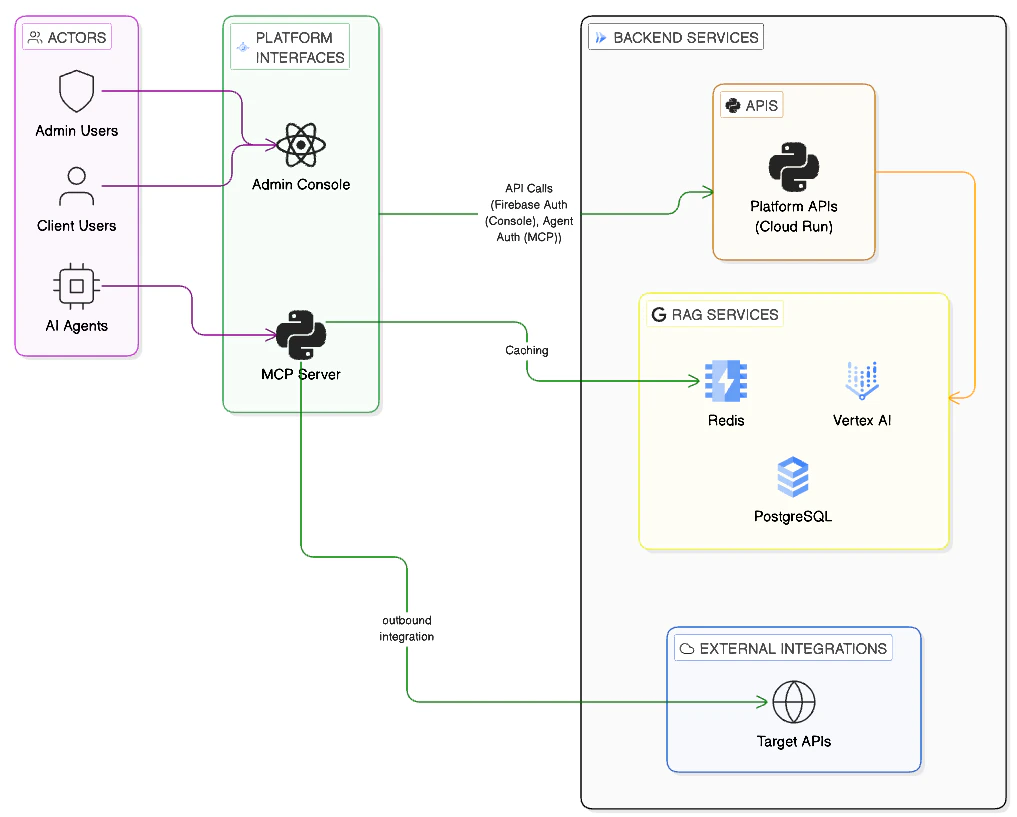 ## How It Works
### Registration and Approval
1. You sign up on the [Admin Console](https://sari-console.web.app) and fill in your profile
2. An admin reviews and approves your registration
3. You can now connect your AI agent to the MCP Server
### AI Agent Workflow
Once approved, your AI agent can discover and call APIs:
## How It Works
### Registration and Approval
1. You sign up on the [Admin Console](https://sari-console.web.app) and fill in your profile
2. An admin reviews and approves your registration
3. You can now connect your AI agent to the MCP Server
### AI Agent Workflow
Once approved, your AI agent can discover and call APIs:
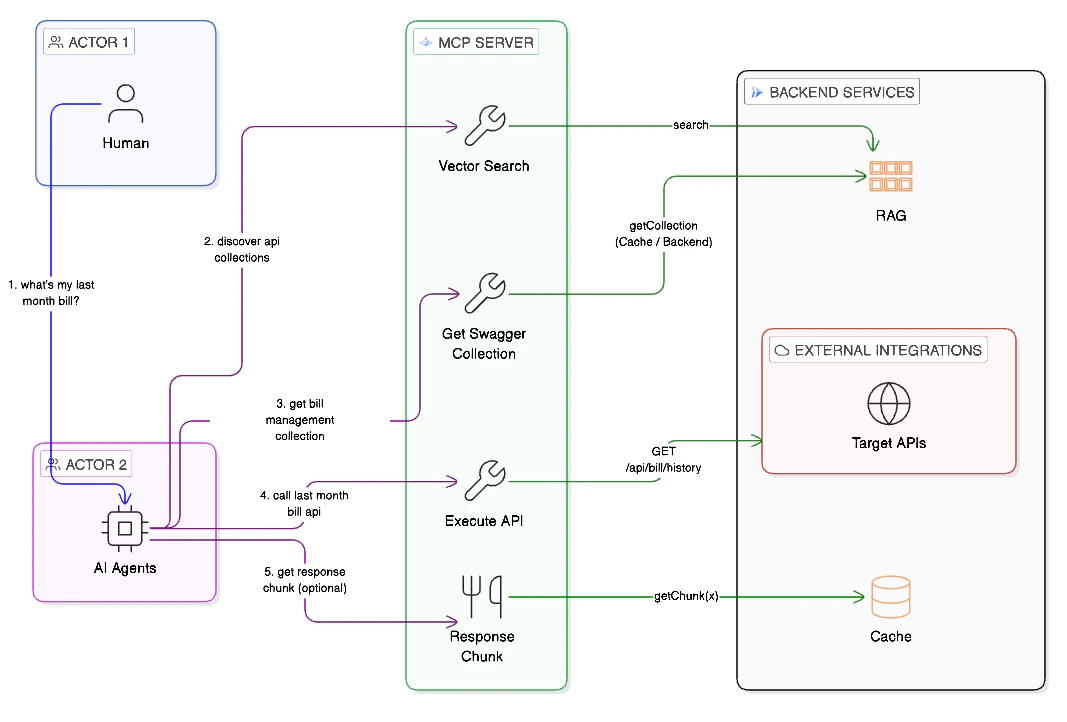 Your agent calls `search_api_collections` with a natural language query (e.g., "payment processing"). The platform performs a vector search and returns matching collections with similarity scores.
Your agent calls `get_openapi_spec` to retrieve the full OpenAPI specification for a collection. This tells the agent what endpoints, parameters, and responses are available.
Your agent calls `execute_api` with the collection name, HTTP method, endpoint, and any required parameters. The platform proxies the request to the target API and returns the response.
## Key Components
| Component | What you interact with | Purpose |
| ----------------- | ---------------------------------------------------- | ------------------------------------------------- |
| **Admin Console** | [sari-console.web.app](https://sari-console.web.app) | Register, view your profile, manage your account |
| **MCP Server** | Via Claude Desktop or other MCP clients | Discover and execute APIs through your AI agent |
| **API Backend** | Indirectly (powers both of the above) | Handles access control, search, and API execution |
## Dynamic Capabilities
API collections can be added and removed at any time by your admin. When a new collection is registered, your AI agent can immediately discover and use it — no reconfiguration needed. Likewise, when a collection is removed, it stops appearing in search results automatically.
Your agent calls `search_api_collections` with a natural language query (e.g., "payment processing"). The platform performs a vector search and returns matching collections with similarity scores.
Your agent calls `get_openapi_spec` to retrieve the full OpenAPI specification for a collection. This tells the agent what endpoints, parameters, and responses are available.
Your agent calls `execute_api` with the collection name, HTTP method, endpoint, and any required parameters. The platform proxies the request to the target API and returns the response.
## Key Components
| Component | What you interact with | Purpose |
| ----------------- | ---------------------------------------------------- | ------------------------------------------------- |
| **Admin Console** | [sari-console.web.app](https://sari-console.web.app) | Register, view your profile, manage your account |
| **MCP Server** | Via Claude Desktop or other MCP clients | Discover and execute APIs through your AI agent |
| **API Backend** | Indirectly (powers both of the above) | Handles access control, search, and API execution |
## Dynamic Capabilities
API collections can be added and removed at any time by your admin. When a new collection is registered, your AI agent can immediately discover and use it — no reconfiguration needed. Likewise, when a collection is removed, it stops appearing in search results automatically.