> ## Documentation Index
> Fetch the complete documentation index at: https://docs.nalhajery.com/llms.txt
> Use this file to discover all available pages before exploring further.
# MCP Overview
> Model Context Protocol integration for AI agents
The Sari Platform exposes its API capabilities through the Model Context Protocol (MCP), enabling AI agents like Claude Desktop to discover and execute APIs dynamically.
## What is MCP?
Model Context Protocol (MCP) is an open protocol that standardizes how AI applications connect to external data sources and tools. It provides:
* **Standardized Communication** - Consistent interface for tools and resources
* **Context Sharing** - Rich context exchange between AI and tools
* **Dynamic Capabilities** - Tools and resources can be added or removed on the fly
## Sari MCP Tools
The Sari MCP Server exposes three tools:
Search for APIs using natural language queries
Retrieve OpenAPI specifications for a collection
Execute API requests against registered collections
## How It Works
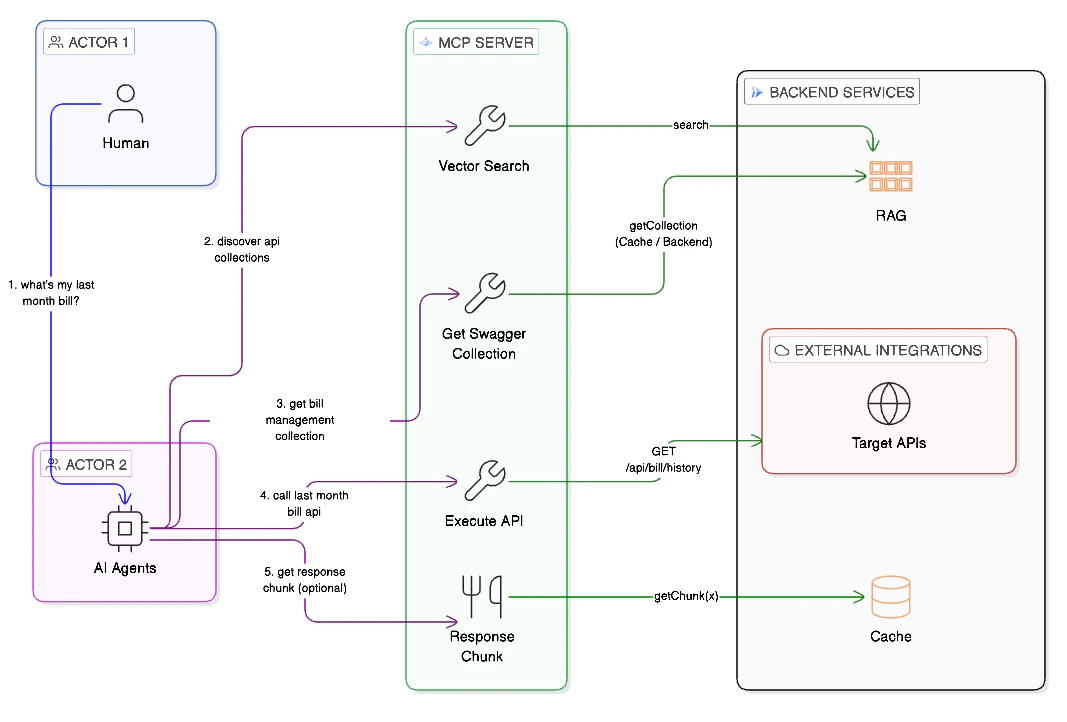 ### Example Workflow
"I need to process a credit card payment"
```
search_api_collections("payment processing credit card")
→ Stripe Payment API (0.89)
→ PayPal Checkout API (0.82)
```
```
get_openapi_spec("Stripe Payment API")
→ Full OpenAPI specification
```
```
execute_api(
collection_name="Stripe Payment API",
method="POST",
endpoint="/v1/charges",
request_data='{"amount": 1000, "currency": "usd"}'
)
```
## Supported AI Clients
Full support via SSE transport or mcp-remote
Any MCP-compatible client can connect
## Next Steps
Configure your AI client to connect to Sari
Detailed documentation for each MCP tool
### Example Workflow
"I need to process a credit card payment"
```
search_api_collections("payment processing credit card")
→ Stripe Payment API (0.89)
→ PayPal Checkout API (0.82)
```
```
get_openapi_spec("Stripe Payment API")
→ Full OpenAPI specification
```
```
execute_api(
collection_name="Stripe Payment API",
method="POST",
endpoint="/v1/charges",
request_data='{"amount": 1000, "currency": "usd"}'
)
```
## Supported AI Clients
Full support via SSE transport or mcp-remote
Any MCP-compatible client can connect
## Next Steps
Configure your AI client to connect to Sari
Detailed documentation for each MCP tool